
OnlyFans PPV bundles are unlocked packages that combine several paid messages into one purchase price. This article answers a specific question: do bundles actually lower your per-item cost, or do they raise your total spend while feeling like a discount? Both outcomes happen often, and the difference depends on math you can do in under a minute. BestOnlyFans treats this as a budgeting problem rather than a hype problem.
It is a pricing decision a creator makes when sending paid messages, usually by grouping several items that would otherwise arrive as separate unlocks. The platform fee of 20% applies to every transaction the same way, so bundles change how much you pay in total, not how the split works.

How OnlyFans PPV Bundles Are Structured
Creators build bundles by attaching multiple media items to a single paid message. The unlock price sits below the sum of individual prices the creator would normally charge, which is the entire selling point.

The creator writes the caption, sets the price, and decides how much detail to include about contents. Transparency varies widely from one page to the next, so your evaluation routine has to work even when the caption is vague.
| Bundle Type | Pricing Mechanism | Subscriber Risk |
|---|---|---|
| Creator-built bundle | One unlock price set manually below the sum of individual item prices | Contents may overlap with items you already unlocked |
| Platform-suggested package | Grouping applied inside the messaging flow at the creator’s chosen discount | Discount depth is unclear without per-item price history |
| Automated multi-item discount | Price drops as item count rises, sometimes within a single campaign | Padding with low-value items can mask a thin real discount |
One structural detail deserves attention. When a creator raises a subscription price, auto-renew stops and existing access lasts until the paid period ends. Bundles do not behave that way. They are one-time unlocks, so a subscription price change never retroactively affects a bundle you already bought.
Calculating True Per-Item Bundle Cost
Your real cost includes the subscription you already pay for the privilege of receiving PPV messages at all.
- Add your monthly subscription cost to the bundle price to get your true outlay for that period.
- Divide the bundle price alone by the number of items to get the nominal per-item figure.
- Divide the combined figure from step one by the number of items to get the effective per-item cost.
- Compare that effective cost against the individual unlock price charged for comparable items.
Example: a paid subscription at $9.99 per month, plus a bundle of eight videos at $32. The nominal per-item figure is $4. If the creator normally charges $6 per video individually, the bundle still saves money, but less than the caption implies.

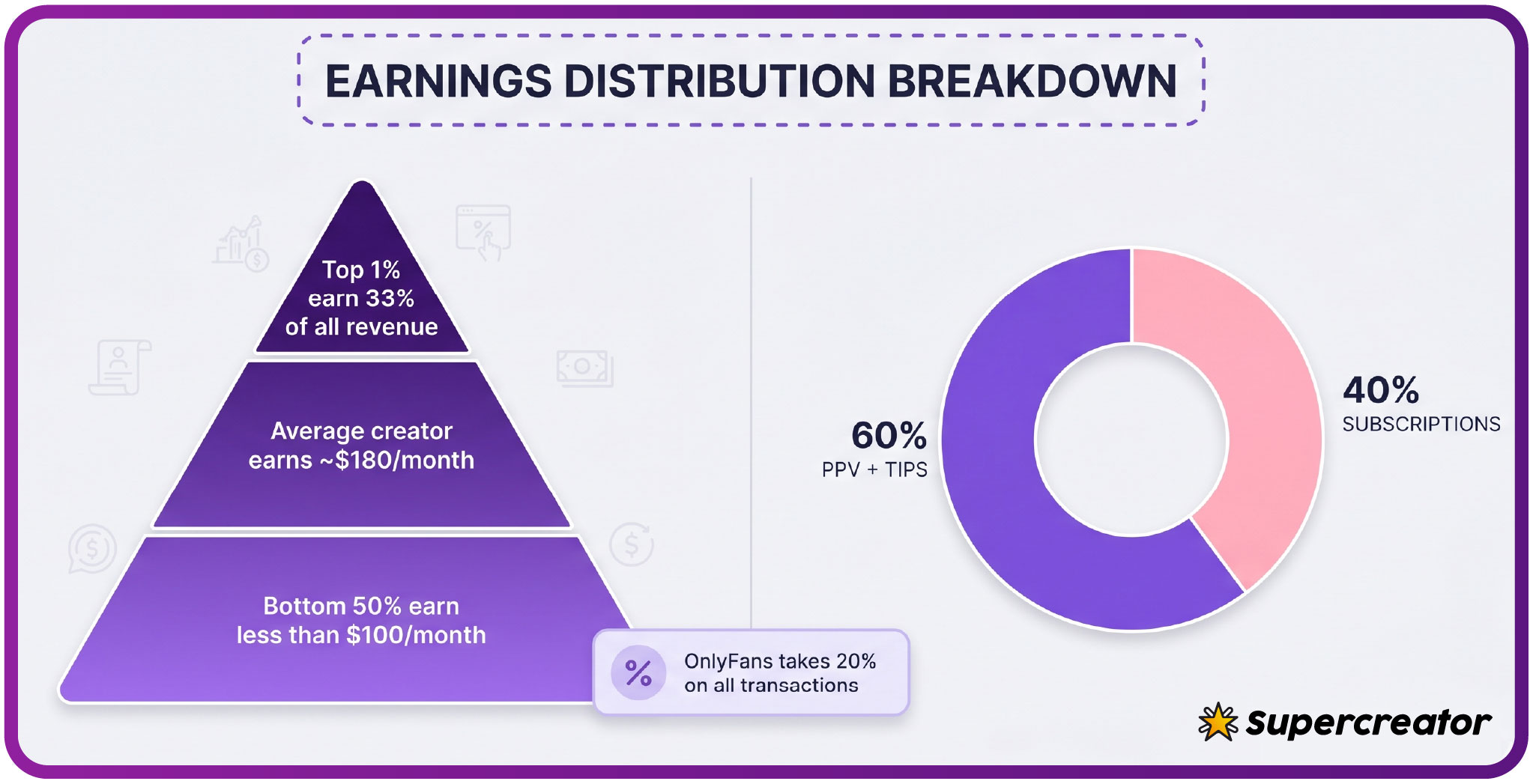
The platform takes 20% of everything, and the creator keeps 80%. That context explains why some creators push bundles hard: a single $30 unlock nets more in one transaction than five separate $5 unlocks after payment friction and message limits come into play. It also explains why promotional first months can dip below $4.99 while base prices cannot.
Tip: before unlocking any bundle above $20, write down the per-item figure you would accept as fair. If the bundle’s effective cost lands above that number, skip it and buy single items instead. Decisions made in advance survive pressure better than decisions made in the moment.
When Bundles Include Content You Already Own
A creator assembles a new bundle, includes three items you unlocked two months ago, and adds four new ones. Against the four items you actually gain, the bundle may cost more than buying those four alone.
- Search your message history for item descriptions or filenames before unlocking a bundle.
- Check your unlock receipts, which record each PPV purchase and its date, and compare counts against the stated item total.
- Ask what proportion of the bundle is new material, and treat a vague answer as a signal to wait.
Overlap is not always dishonest. Creators often repackage older content for subscribers who joined recently and never saw it. The problem is the pricing optics: a bundle containing mostly old items can be fair for a new subscriber and a poor deal for a long-term one. Time on the page changes the value, even when the price does not.

Comparing Bundle Value Across Content Types
Value density varies by format. A bundle of long videos at a single price usually delivers more minutes per dollar than a bundle of short clips. Photo sets are the most variable: a fifty-photo set and a ten-photo set can carry the same bundle price, and the difference is rarely reflected in the caption.
- Video runtime per item, since a twelve-minute video and a ninety-second clip should not carry equal weight in your math.
- Photo count per set, and whether images are full-resolution downloads or in-feed only.
- Exclusivity claims, which are hard to verify and should not raise your willingness to pay on their own.
- Mixed-media composition, because a bundle blending formats makes per-item comparison harder and often hides padding.
- Delivery method, since items sent as separate messages are easier to track than a single message containing everything.
When a creator combines a few strong videos with a large volume of older photos, the item count inflates while the genuinely new value stays flat. Subscribers comparing bundle offers on ranking sites dedicated to the best onlyfans actress pages should apply the same per-item math regardless of how a page is rated.
The Psychology of Bundle Pricing Pressure
Time-limited offers are the primary pressure mechanism. A bundle described as available for twenty-four hours triggers a faster decision than the same bundle left open indefinitely. Creators know this, and the countdown framing is usually a marketing choice rather than a technical constraint.
Three Common Pressure Tactics
Exclusive framing works similarly. Labeling content as never reposted or limited to this group raises perceived scarcity. The claim may be true, but it is unverifiable from the subscriber side, so it should not change your break-even math at all.
The third mechanism is volume anchoring. A bundle priced at $40 next to a stated individual value of $90 makes $40 feel small. Your job is to ignore the anchor and evaluate the $40 against the items you would have bought anyway.
For platform context, the paid subscription range runs from $4.99 to $49.99, with typical pricing between $4.99 and $15 and averages clustering around $5 to $10. Free pages set the price to $0 and earn through PPV messages and tips instead. PPV messages unlock up to $50, paid chat commonly runs $3 to $5 per message, and tips can reach $100.

Using BestOnlyFans to Spot Creator Bundle Patterns
Because the platform has no built-in discovery feed or directory, ranking sites exist to fill that gap. This brand tracks PPV frequency and pricing bands across pages, which lets you see whether a creator sells mostly single items or leans heavily on bundles.
| BestOnlyFans Indicator | What It Signals | Subscriber Action |
|---|---|---|
| High PPV frequency | Frequent paid messages, often several per week | Set a weekly unlock ceiling before subscribing |
| Average unlock price band | Typical price range for individual items on that page | Use the band as your comparison baseline for bundles |
| Promo density score | How often discounts and limited offers appear | Expect more time pressure and plan purchases in advance |
A creator with a steady per-item price and few promos is usually easier to budget for than one with constant bundle campaigns. Neither is inherently better. The point is matching your spending style to the page’s sales style before money changes hands.

Setting Personal Bundle Purchase Rules
The four below are deliberately simple, and you can adjust the numbers to fit your own budget without changing the structure.
- Cap any single bundle at 25% of your monthly content budget, so one purchase can never consume the month.
- Require at least 70% new items, verified through your unlock history, before treating a bundle as a discount.
- Wait twenty-four hours on any bundle above $20, even when the offer claims to expire sooner.
- Recompute the effective per-item cost with your subscription included before every unlock, not just the first one.
These constraints do not eliminate bundle purchases. A $0.10 card verification hold, refunded within days of signup, is the only charge that should ever appear before you have decided anything.
Documenting Bundle Purchases for Budget Accuracy
Bundles obscure individual item costs, so a monthly total on your bank statement tells you almost nothing about value received. A short log fixes that. Five fields per purchase are enough to reconstruct your real spending pattern months later.
- Total price paid for the bundle.
- Item count as stated by the creator.
- Estimated individual prices for those items, taken from the normal per-item rate.
- Overlap risk, meaning how many items you had likely already unlocked.
- Effective per-item cost, calculated with your subscription share included.
After three months, the log shows which creators deliver value and which ones rely on repackaging. That evidence is more reliable than memory, and it makes the next bundle decision nearly automatic. Where numbers disagree with your impression of a page, trust the numbers.
FAQ
Can I see exactly what is inside a PPV bundle before I pay to unlock it?
Only to the extent the creator describes it in the message caption. There is no platform panel listing bundle contents item by item, so detail depends entirely on what the creator chooses to write. If the caption is vague, ask before unlocking, and treat a refusal to clarify as a reason to skip the purchase.
Do bundle purchases affect my monthly auto-renewal amount or billing date?
Your auto-renewal amount and billing date stay tied to the subscription price you agreed to. Note that if a creator raises the subscription price, auto-renew stops and your existing access runs until the current paid period ends.
What happens to bundle content if the creator later deletes their page?
Access generally ends with the page. Unlocked PPV items live inside the platform’s messaging system, so a deleted account removes the delivery channel along with it. Treat any bundle purchase as access for as long as the page operates, not permanent ownership.
Is there any way to get a partial refund if a bundle contains content I already bought?
You can contact the creator directly and some will issue a goodwill credit or bonus item, but this is voluntary. The practical protection is the pre-purchase overlap check described earlier, plus keeping bundle spending inside a budget you can absorb when a purchase disappoints.